Your Training Instrument Panel

New in 1.6 Your coach reads your recovery, answers your questions, and can design a complete 8- or 12-week program for you.

ProgressPilot builds each session the moment you’re ready to train — AI-designed on Premium — scores every set, and moves your progression forward after every workout — with every metric that matters on one cockpit dashboard, without the cost of a personal trainer.

Free tier available · 30-day premium trial · Cancel anytime · iPhone, iOS 18.6+

Local-first No ads or tracking Works offline Syncs with iCloud

How It Works

From setup to your first AI-designed session in three steps.

1

Set Up in 2 Minutes

A 4-step setup — goal, experience, equipment, and how often you train. Your coach proposes your first session immediately; add finer details later.

2

Train With Your AI Coach

Whenever you’re ready, your coach proposes a focus and designs the session — exercises, sets, reps, and weights — from up to 16 weeks of your training history and how you feel today. On Premium the AI designs every session; on Free it designs your first, and the built-in engine takes it from there.

3

Get Smarter Every Session

Every set and score feeds your next targets, re-decided from that workout’s own numbers — not a fixed weekly bump. On Premium, the AI coach reads it all when it designs your next session.

See It in Action

A real coaching experience, right on your phone.

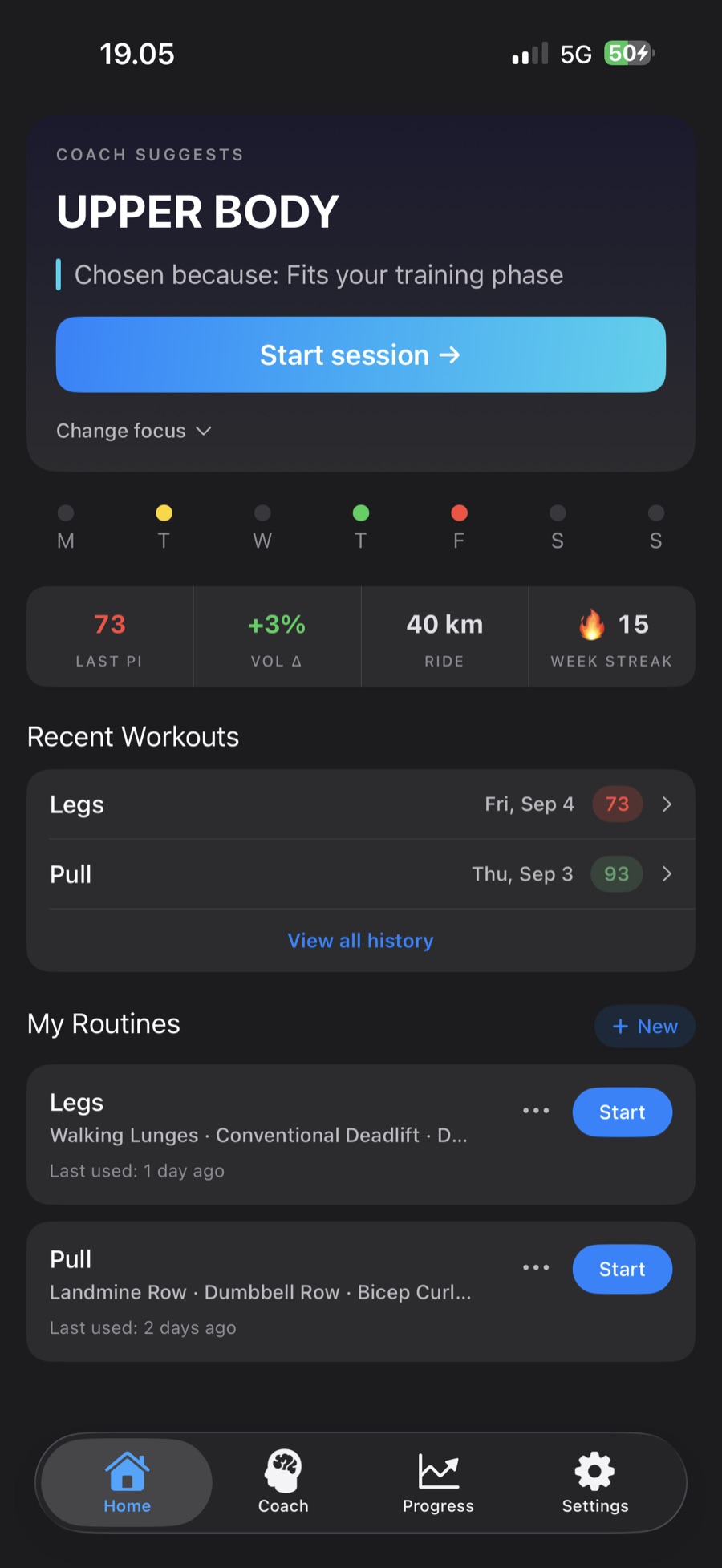
ProgressPilot home screen with the coach's suggested Lower Body session, a week dot strip, a telemetry strip with last PI, volume change, a run and a 24-week streak, and a Ready readiness card scoring 98 from 7.8 hours of sleep, 62 ms HRV and a light training load
Cockpit HomeYour coach proposes today's session and the telemetry strip shows score, volume and streak. On Premium it adds your latest cardio, and a readiness card reads your sleep, heart-rate variability and recent load.
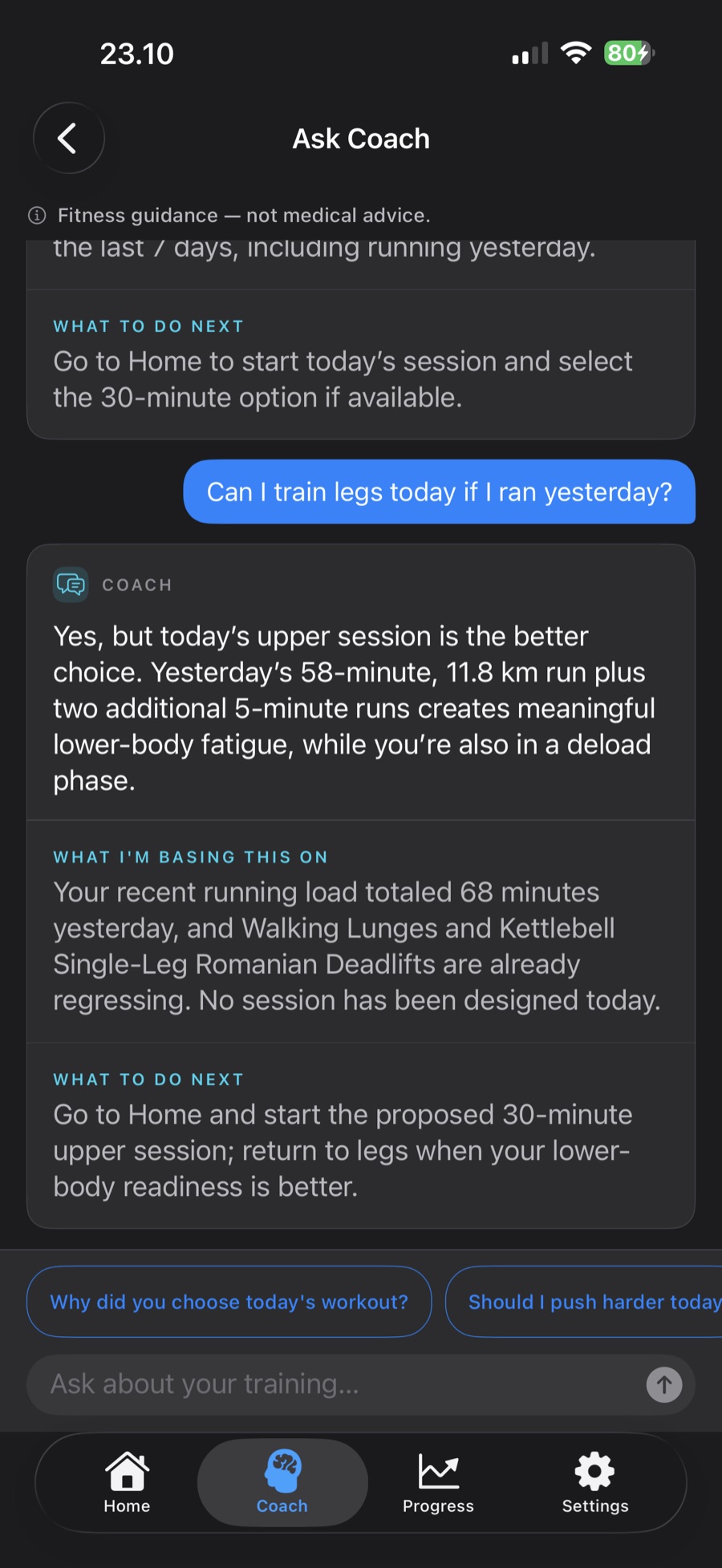
Ask Coach conversation: asked whether to train legs the day after a run, the coach suggests today's upper session instead, explains what it is basing that on from the athlete's own runs and lifts, and says what to do next
Ask CoachAsk your coach anything. Answers come from your own sessions, with what they're based on and what to do next. Premium.
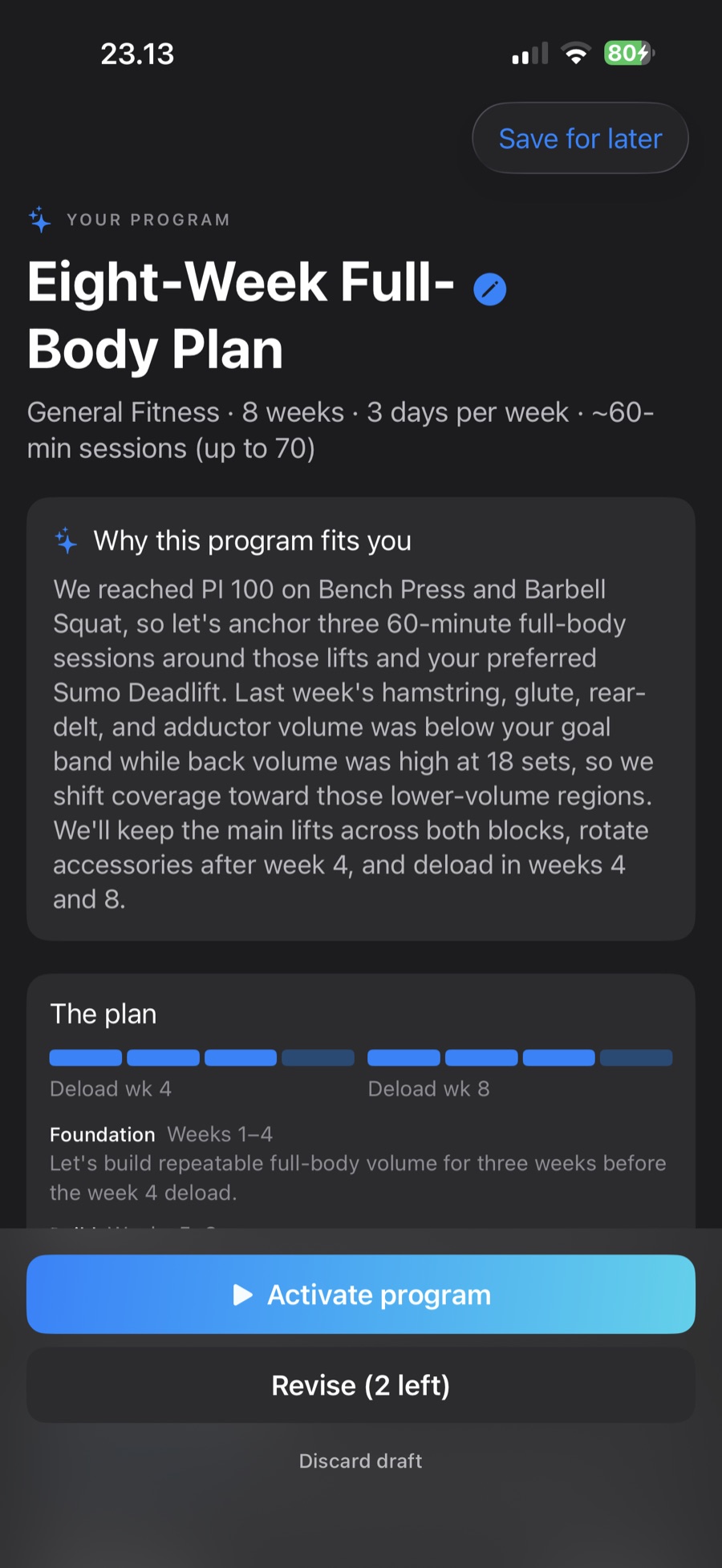
Custom Program reveal for an Eight-Week Full-Body Plan: 8 weeks, 3 days a week, about 60-minute sessions, a Why this program fits you explanation, a two-block plan with deloads in weeks 4 and 8, and Activate program and Revise (2 left) buttons
Custom ProgramAn 8- or 12-week program designed from an intake and your history, with blocks, deload weeks and two revisions. One-time purchase.
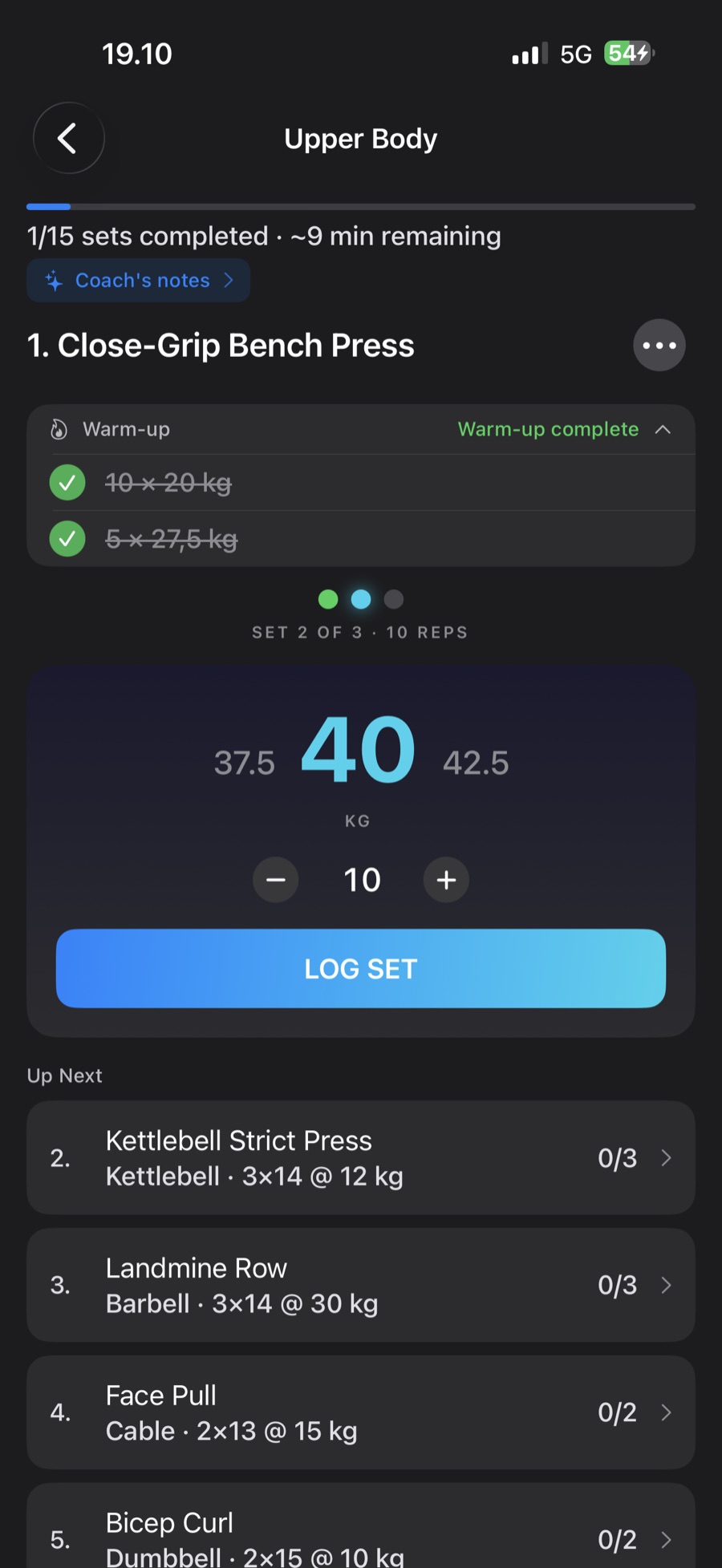
Active session for barbell squat with two of three warm-up sets ticked off, a large weight dial at 52.5 kg, a reps stepper, a Log Set button, and the up-next exercise list
Active SessionA large weight dial, set pips and warm-up sets that ramp to your working weight. One tap logs the weight you actually lifted, with instant PI feedback the moment you hit a PR.
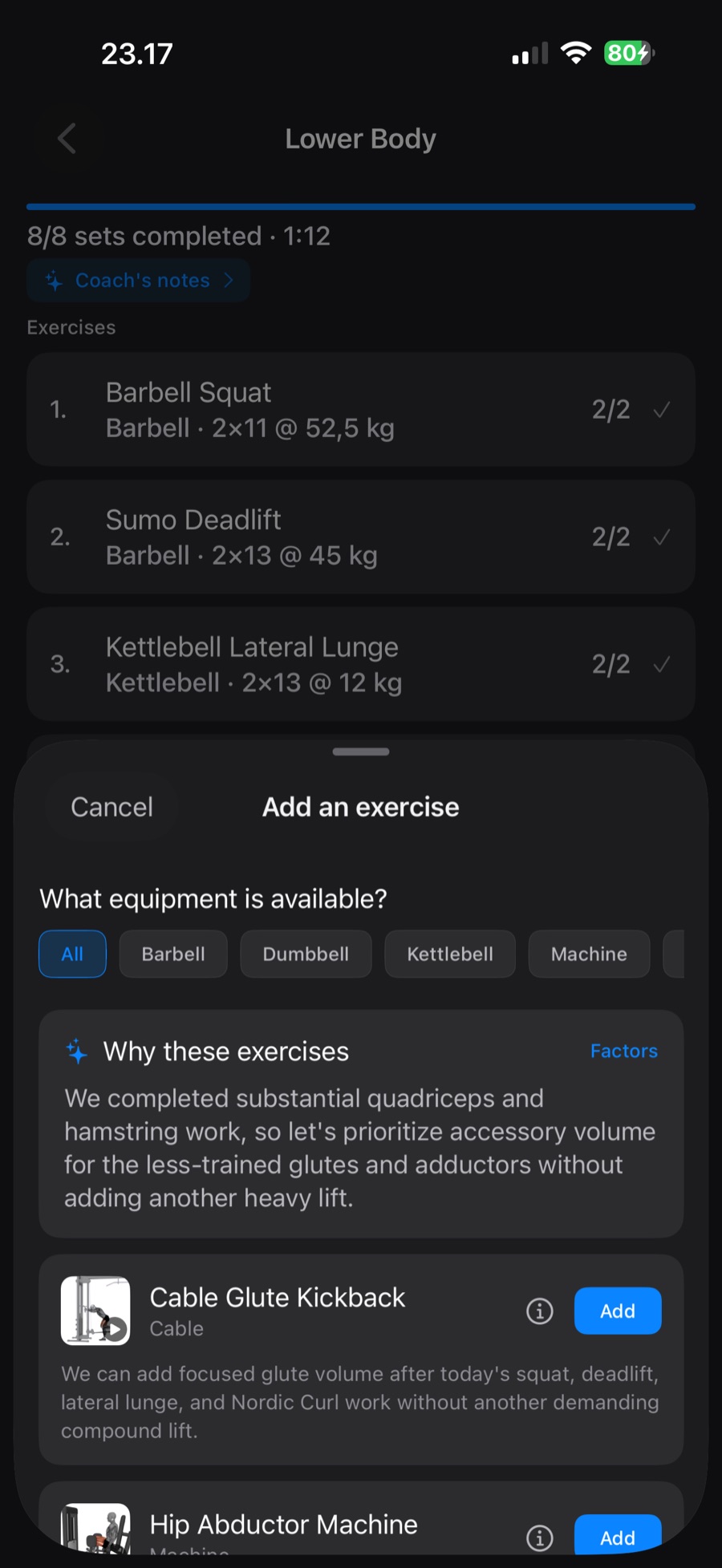
Add an exercise sheet after all sets are done: a Why these exercises explanation and coach-suggested exercises such as cable glute kickback and hip abductor machine, each with a reason and an Add button
Got More in You?Finished the plan with energy to spare? The coach suggests what would round out the session, and why. Premium.
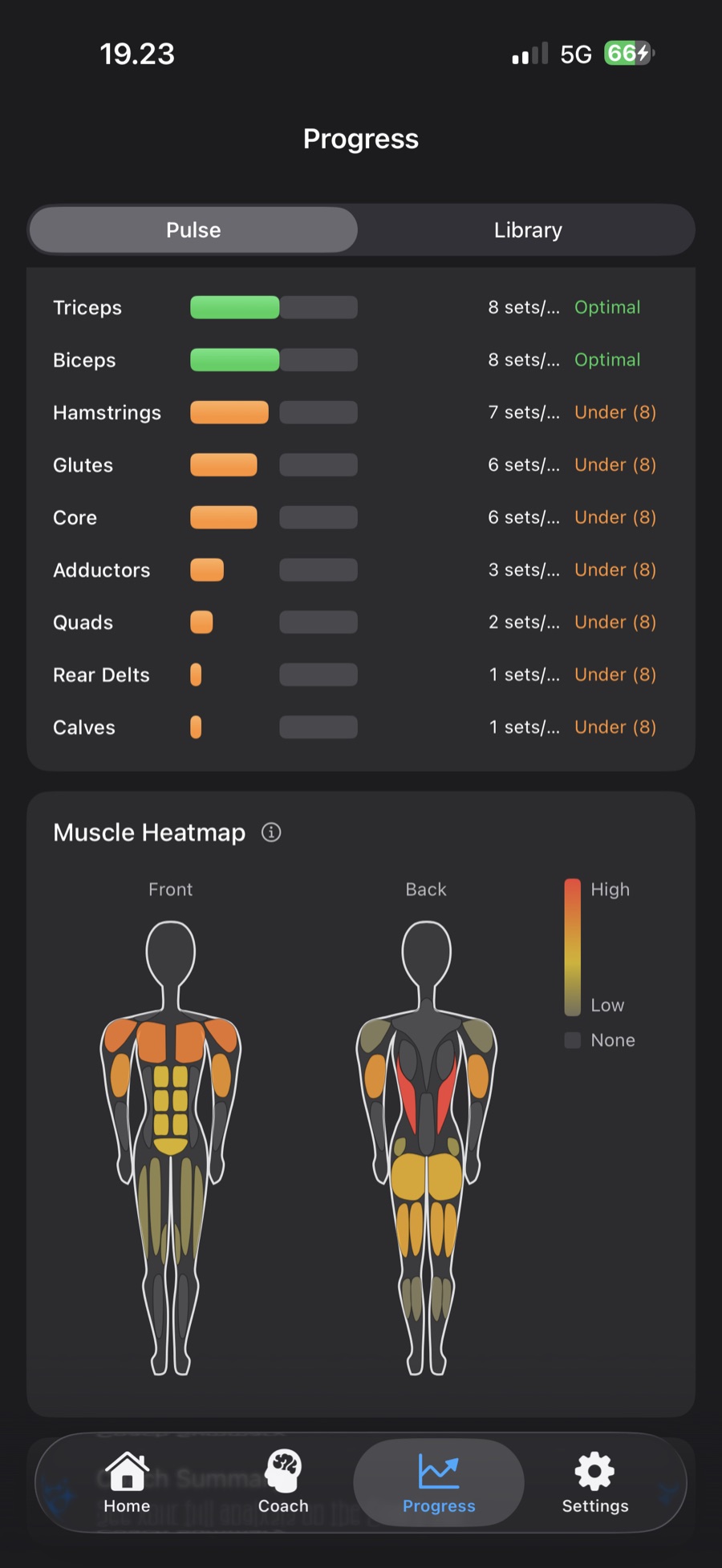
Progress Pulse screen with weekly set counts per muscle against a target zone, and a front-and-back body heatmap colored by 24 weeks of training volume
Muscle HeatmapFront and back silhouettes light up by training volume, right under per-muscle weekly set targets. Premium.
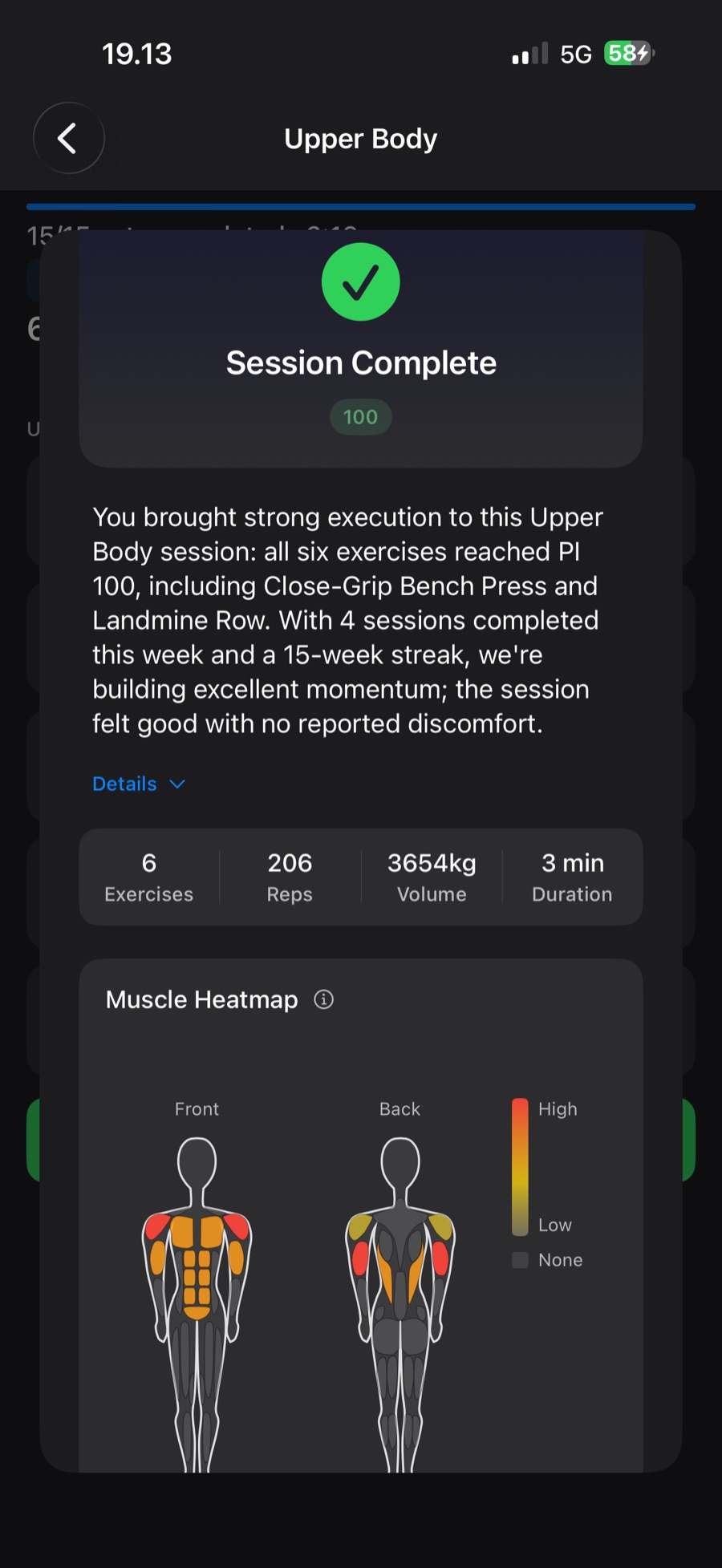
Session Complete sheet with a PI badge of 100, an AI coach summary, a stat strip of exercises, reps, volume and duration, and a single-session muscle heatmap
Session CompleteA PI score and the numbers on any plan; Premium adds a coach summary and the muscles this session worked.
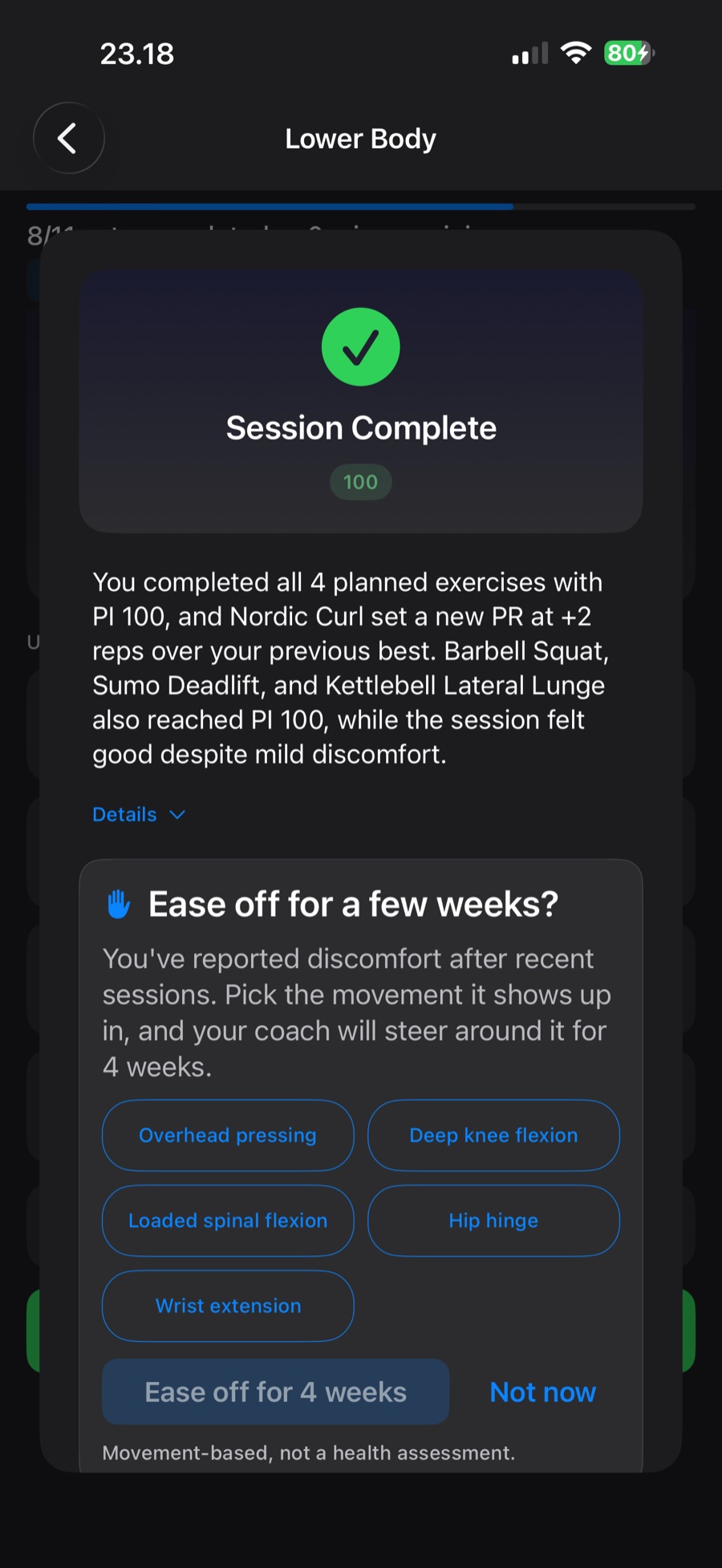
Session Complete sheet with a PI of 100 and a coach summary, followed by an Ease off for a few weeks card offering movement patterns such as overhead pressing, deep knee flexion and hip hinge to steer around for 4 weeks
Ease Off a MovementReport discomfort and the coach offers to steer around that movement pattern for four weeks. Movement-based guidance, not a health assessment. Premium.
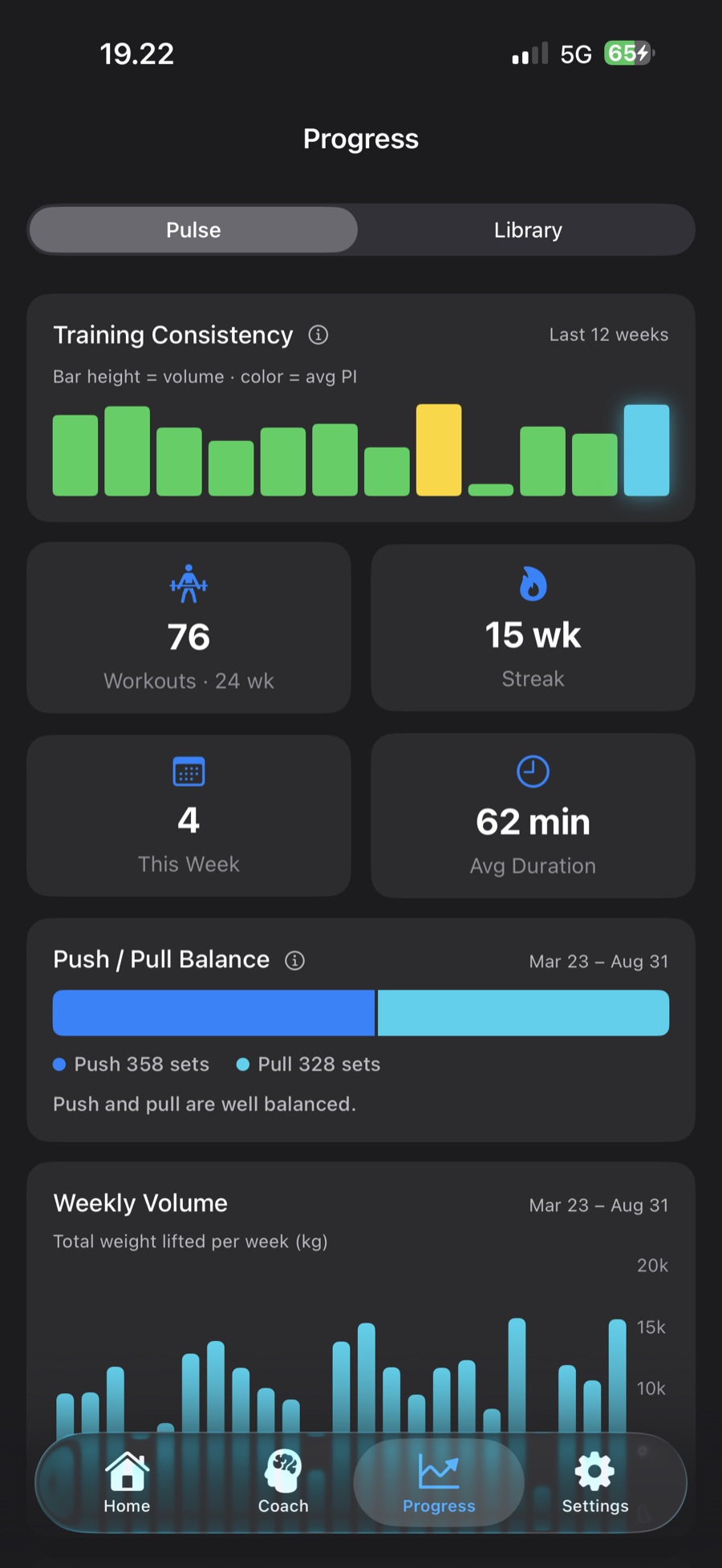
Progress Pulse screen with workout, streak, this-week and average-duration tiles, a 24-week volume chart colored by each week's average PI, and the average PI trend
Progress PulseWeekly volume, PI-colored week by week, with your PI trend and muscle balance underneath. Premium; Free shows the last 7 days of volume and PI, day by day.
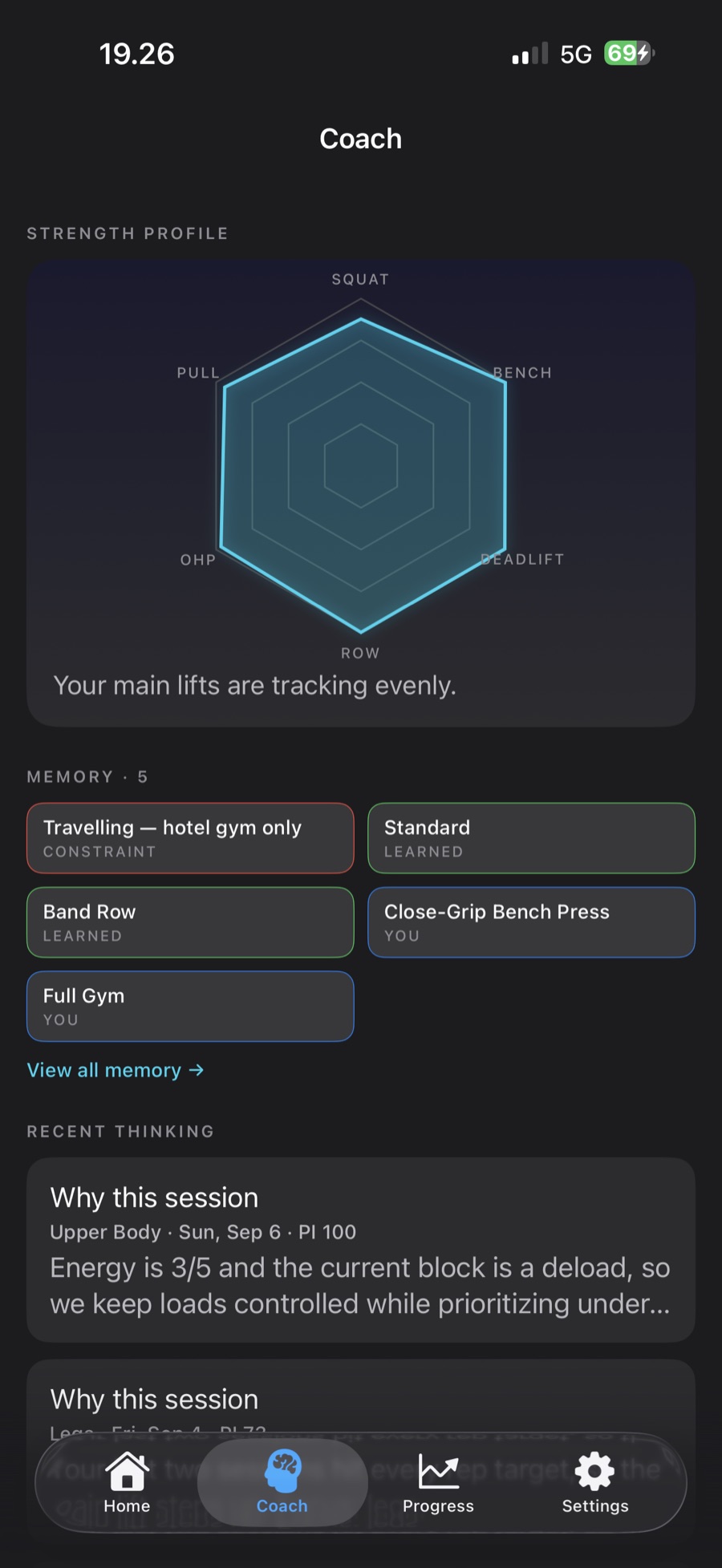
Coach tab with an Ask Coach card and suggested questions, a six-axis Strength Profile radar, and the Custom Program card
Coach TabAsk your coach a question, see your six-axis Strength Profile, and find the Custom Program, Coach Memory and the coach’s recent thinking.
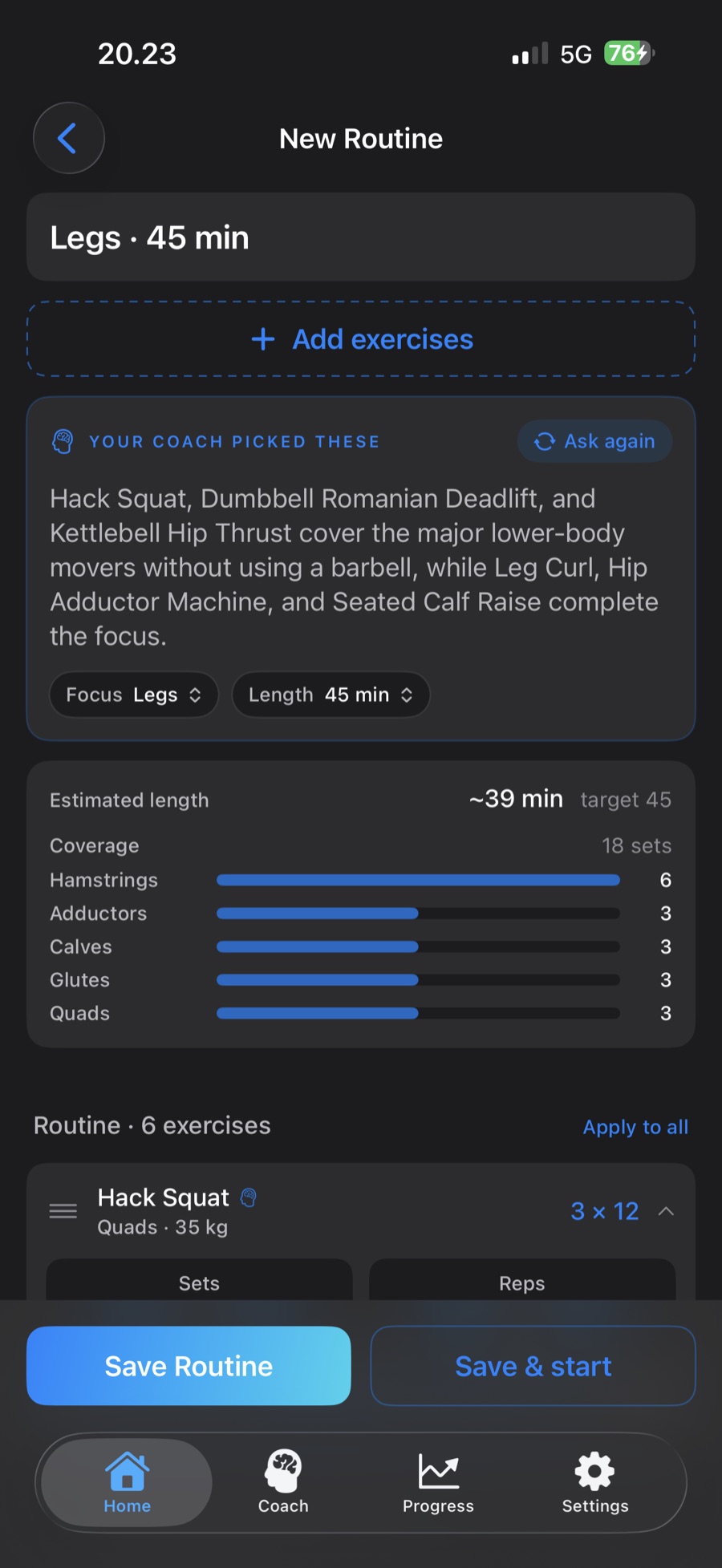
New Routine builder with the coach's rationale for a 45-minute Legs routine, focus and length chips, an Ask again button, estimated length against target, and muscle coverage bars
Routine BuilderAsk for a focus and a length; on Premium the coach picks the exercises, says why, and can be asked again. Edit anything or save it.
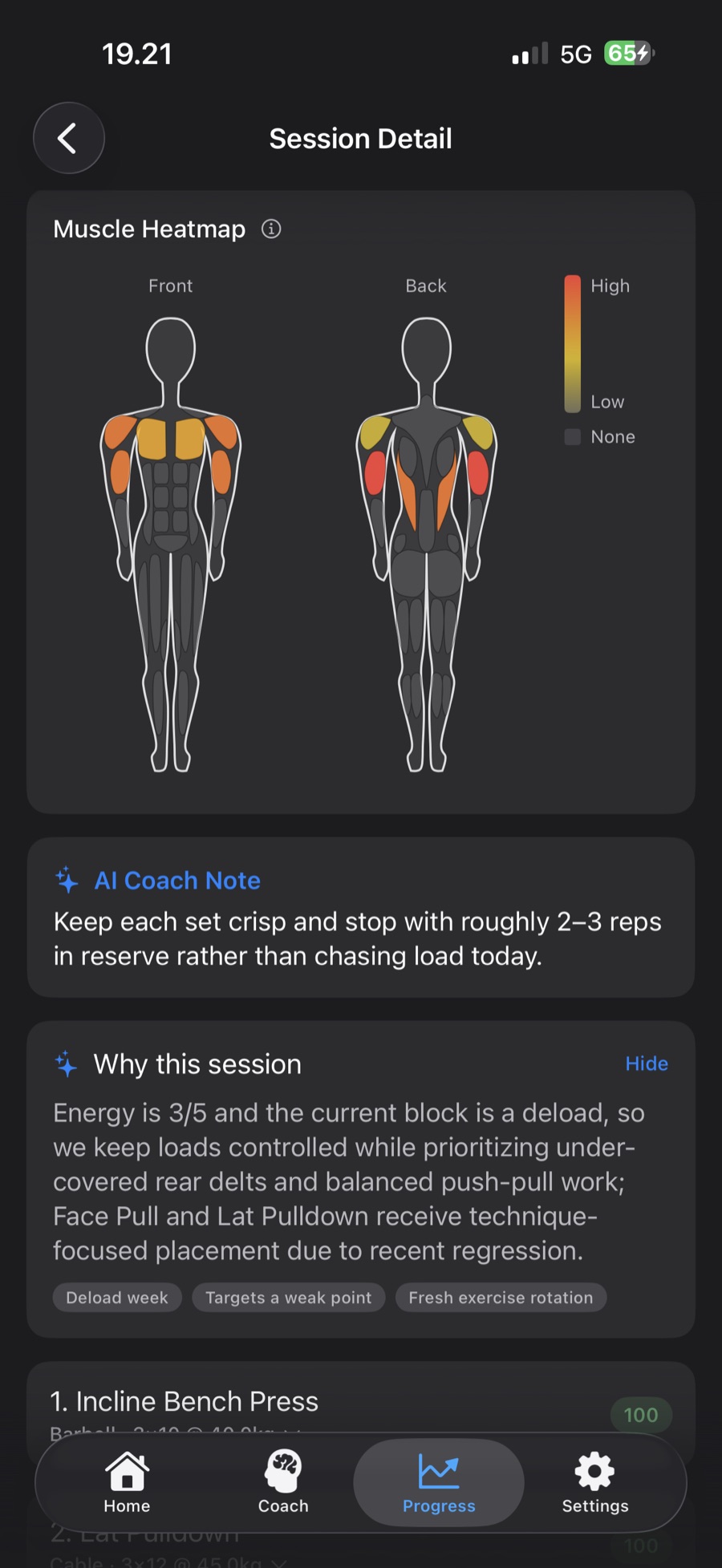
Session detail screen with a Why this session card explaining the coach's reasoning and factor chips for deload week, weak point and exercise rotation
Why This SessionEvery coach-designed session carries its reasoning and the factors behind it. Premium.
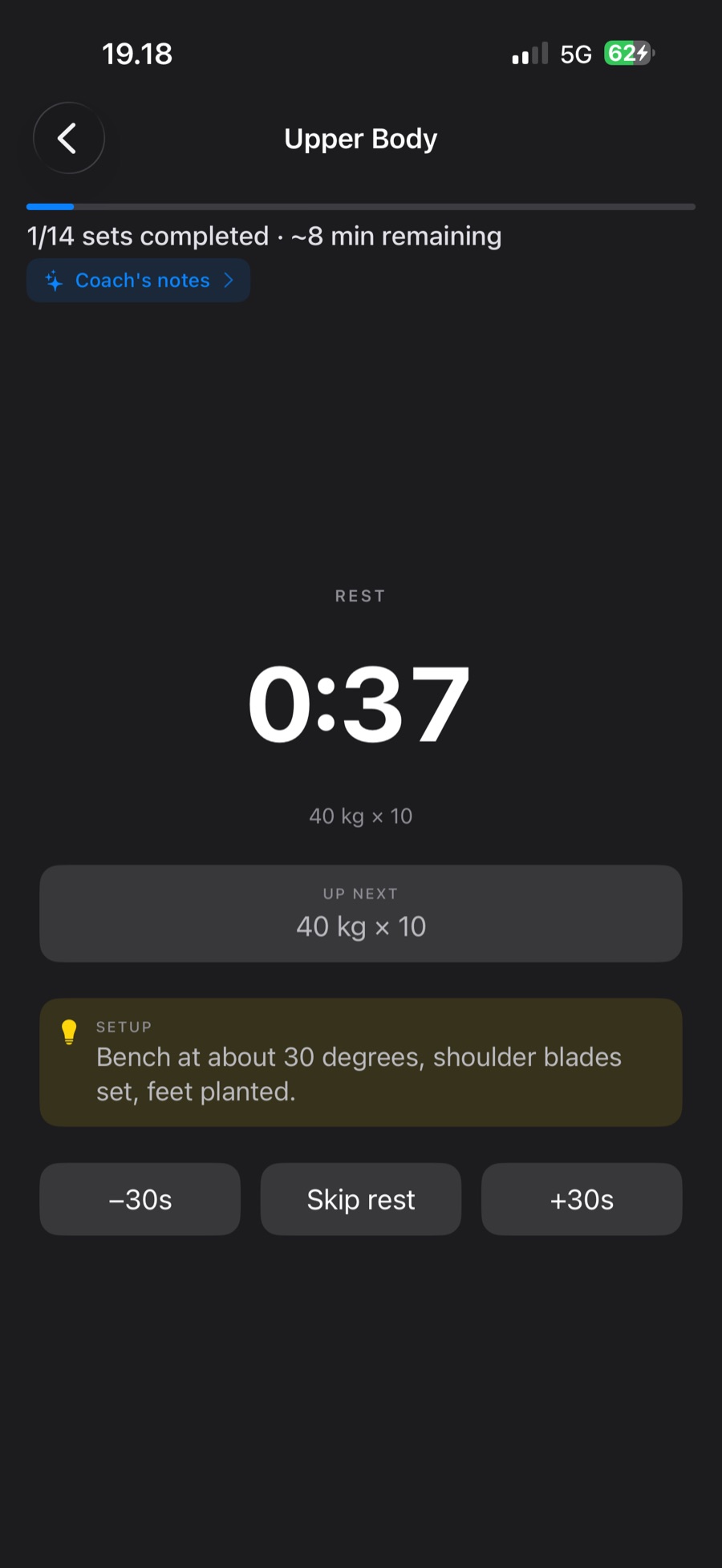
Full-screen rest timer at 37 seconds with the just-logged set, the up-next set, and a setup technique cue for incline bench press
Technique CuesThe immersive rest timer shows the set you logged, what's next, and a coaching cue for the lift. Premium, and unlocked in Custom Program sessions.
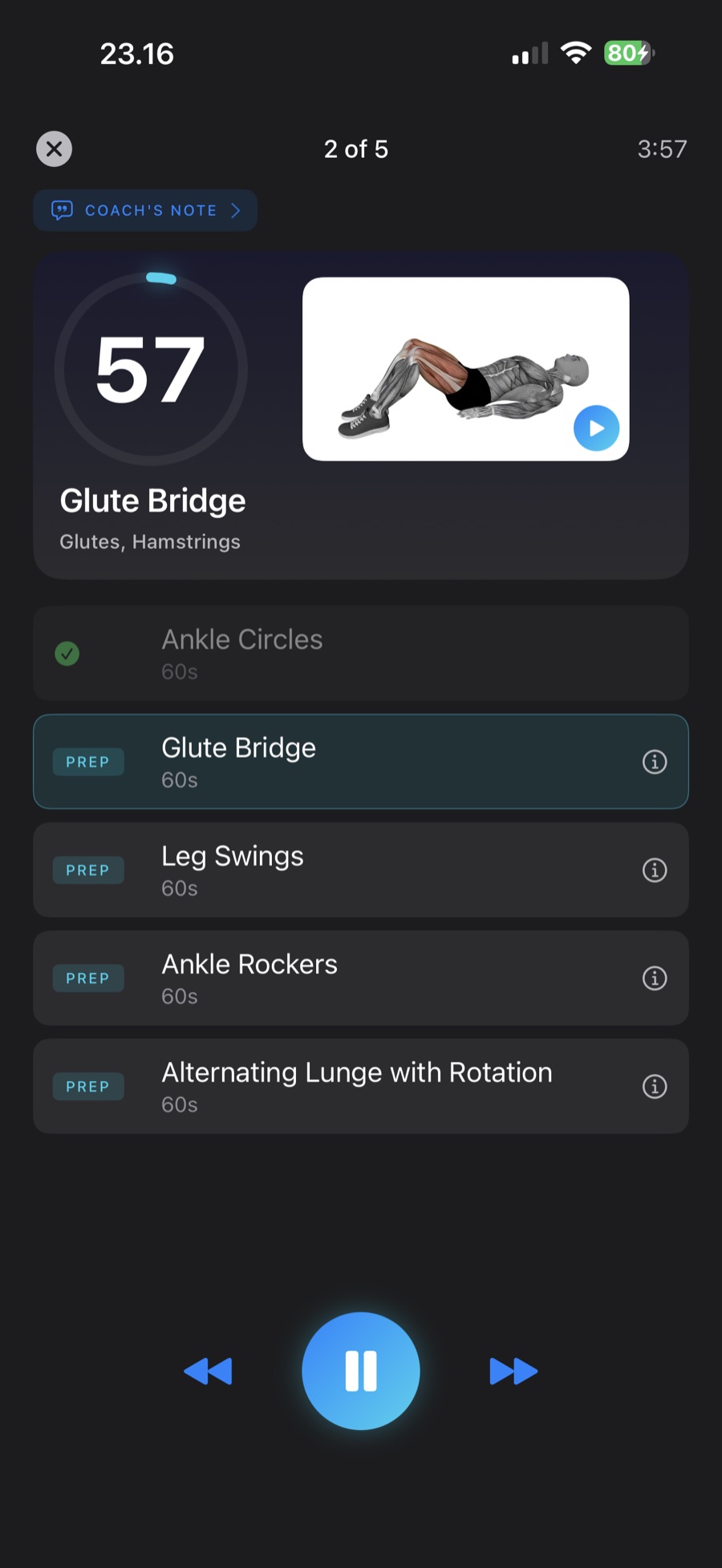
Guided warm-up routine on step 2 of 5, a 57-second timer for glute bridge with its demonstration video, and the remaining prep moves listed below
Warm-Up RoutineA guided mobility routine before you lift, timed step by step with a demo for each move. Premium.
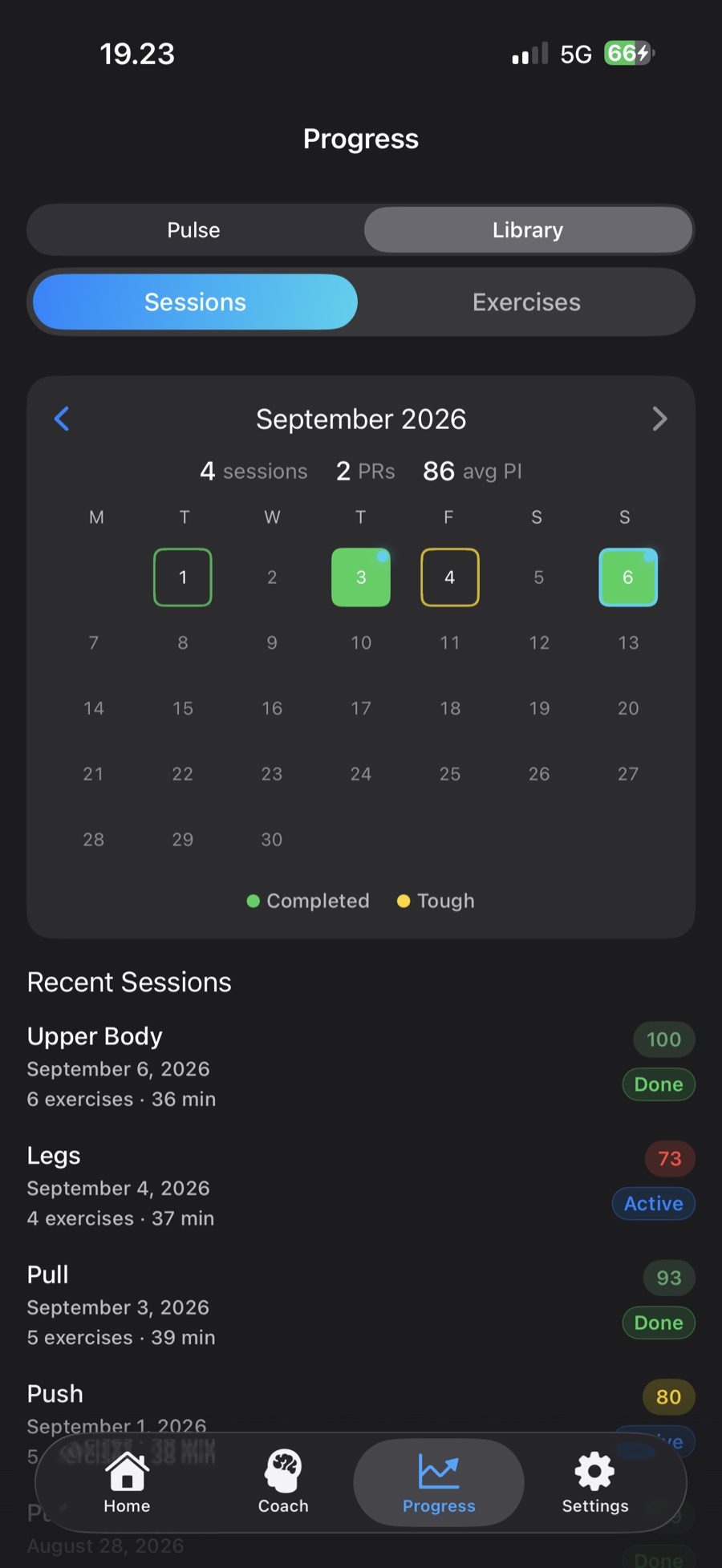
Library calendar for August with round day cells colored by session quality, PR dots, a month summary of 17 sessions, 9 personal records and an average PI of 94, and the recent sessions list
Training CalendarEvery session on the calendar, colored by how it went, with PRs marked and a month summary of sessions, PRs and average PI.
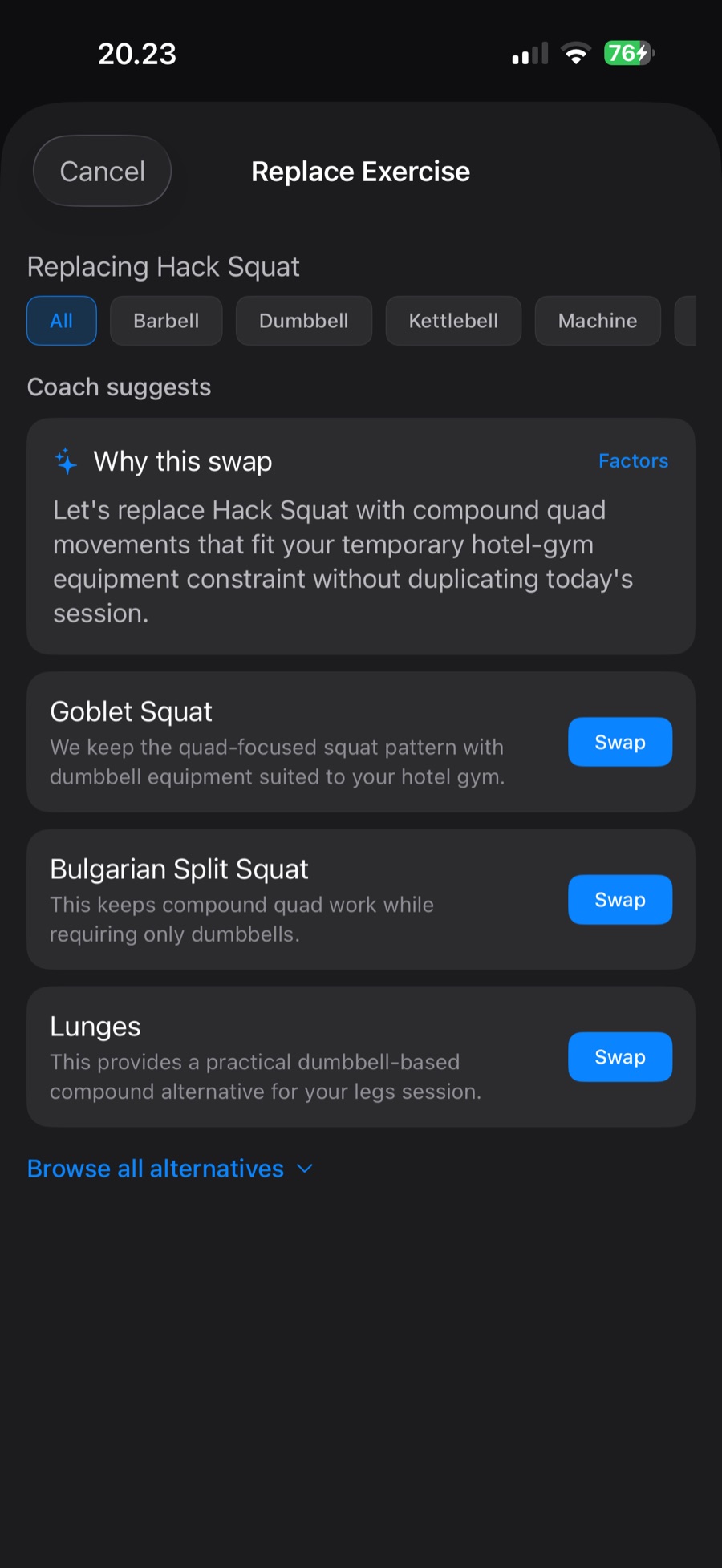
Replace Exercise sheet with a Why this swap explanation and three coach-suggested alternatives to hack squat, each with a reason and a Swap button
Smart SwapsEquipment taken? Three ranked alternatives with reasons on Premium, or browse the whole catalog on any plan.
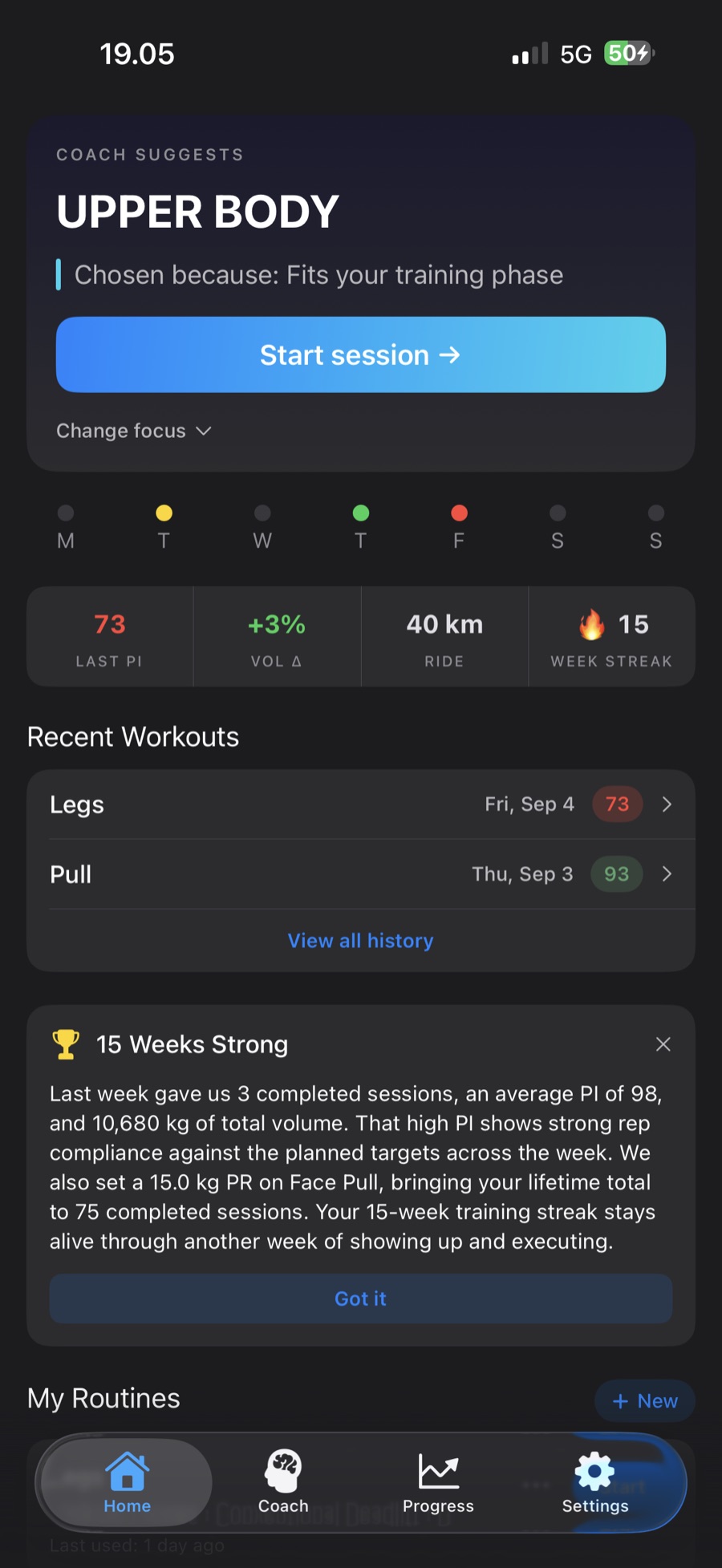
Home screen with a Weekly Recap card summarizing last week: three sessions, an average PI of 98, total volume, a PR, and the training streak
Weekly RecapA short look back at the week you trained: sessions, average PI, PRs, and streak. Premium.

Everything You Need to Progress

AI Coaching Core

On-Demand Coach Sessions

No standing weekly plan. Any time you’re ready, your coach proposes a focus — with a one-line reason and a “Change focus” option — then designs the session from up to 16 weeks of your history. AI-designed every time on Premium; on Free, your first session is AI-designed and the built-in engine designs the rest.

Recovery & Readiness

Turn on sleep and heart data from Apple Health and Home reads your day as Ready, Moderate, or Take it easier — from last night’s sleep, your heart rate variability against your own 7-day average, recent training load, and how you say you feel. The coach designs the session around it, and you can always overrule it. Premium.

Train When You Train

No fixed weekdays and no plan to fall behind on. Tell the app roughly how often you train and the coach sizes your sessions around it — miss a day and nothing breaks.

Performance Index (PI)

Every set scored 0–100 with instant color-coded feedback. Green for strong, yellow for solid, red for below target.

Progression Every Session

The coach reads PI trends, feedback, and fatigue after every workout. It increases weight when you’re ready and backs off when you need recovery — no waiting for a weekly review. Pick the pace: conservative, balanced, aggressive, or maintenance for a busy stretch.

AI Session Targets

Every exercise gets a specific rep and weight target drawn from the sets you actually logged — set by set, not last session on repeat. Premium.

Build Your Own Workout

Pick a focus — push, pull, legs, upper, lower, or full body — a length, and tell the coach anything it should know about today. Premium assembles a complete session you can edit, swap, re-roll, or save as a routine; everyone can build from the full catalog.

Saved Routines

Build a routine on one canvas — name it inline, drag to reorder, and set sets and reps per exercise — then save it or start it right away. Edit any routine later from its “…” menu. Three routines free, unlimited on premium.

Your Coach, in the Open

Ask Coach

Ask anything about your training — why today’s session, whether to push harder, what’s holding back your bench — and get an answer grounded in your own history. The coach can also swap an exercise, rebuild today’s session lighter or shorter, remember a preference, or — when you mention discomfort — offer to ease off a movement, each shown as a preview you confirm first. Premium.

Coach Check-In

Feel stuck? Once a week, run an on-demand training analysis from the Coach tab. The AI tells you what’s working, what’s holding you back, and gives an impact-ordered action plan — which your coach then follows in every session it designs until your next check-in. Switch any item off. Premium.

Recent Thinking

Every session the coach designs and every exercise swap explains why this, why now. The Coach tab keeps a running “recent thinking” log so you can see the reasoning behind each decision the coach made. Premium.

Coach Memory

What the coach remembers about you — avoided and favorite exercises, equipment, coaching style, and session length — each with where it came from. Visible and editable from the Coach tab, and used every time it builds your workout. Premium.

Strength Profile

A six-axis radar across Squat, Bench, Deadlift, Row, Overhead Press, and Pull — see where you’re balanced and where you’re lagging at a glance in the Coach tab. Free for everyone.

AI Coach Summary

A plain-language readout in the Coach tab of where your training stands right now and what the coach is steering toward next. Premium.

Notes That Resurface

Jot a note — seat height, grip, straps — or flag movement discomfort on any exercise; it comes back next time you train that lift so nothing gets forgotten between sessions. Premium.

Ease Off a Movement

When a movement pattern keeps bothering you — overhead pressing, deep knee flexion, hip hinge, and more — flag it on the exercise, in your session feedback, or in Ask Coach, and the coach offers to ease off it for four weeks. Every session, swap, and suggestion steers around it; a Home banner counts down the days, and you can renew or end it anytime. Movement-based guidance, not a medical assessment. Premium.

In the Workout

Redesigned Active Session

A large weight dial and set pips make logging effortless — one tap records the weight you actually lifted. Between sets, an immersive full-screen rest timer shows an “up next” preview, plus a technique cue on Premium, also unlocked in Custom Program sessions. Started by mistake? Discard the workout and it stays out of your history.

Smart Warm-Up Sets

The first main lift for each part of your body gets an automatic warm-up ramp — the full 40 %, 60 %, 80 % pyramid for the lift that opens the session, shorter ramps once you’re going — so you arrive at the working set ready, not toasted. Premium, and in every Custom Program session.

AI Warm-Up & Cool-Down

Personalized mobility routines tuned to today’s focus, muscle groups, and how you’re feeling. Start the warm-up when you’re ready; the cool-down appears after your last set. Premium.

Progress: Pulse & Library

Pulse shows your workout and streak tiles, weekly volume colored by that week’s PI, and your PI trend; premium adds muscle-balance verdicts, volume zones per muscle, and a body heatmap that lights up the muscles you’ve trained. Library pivots between a Sessions calendar — color-coded days, PR markers, and a month summary — and an Exercises view with per-lift trends.

Shareable PR Cards

Hit a personal record and generate a branded card to share — your lift, the number, and the moment, ready for the group chat.

Train With a Friend

Show your workout as a QR code, or send the link, and your friend opens the same exercises in ProgressPilot at their own starting weights — ready to start or save as a routine. The link carries the exercises, sets and reps, never your weights. Free for everyone.

Training Fuel Tips

Switch them on and the coach adds one short fuel cue to your session summary or weekly recap when the training calls for it — timing and hydration, never a diet plan. Premium.

Got More in You?

Logged every planned set and still have energy? Add an exercise — the coach suggests three that complement today’s session, each with a reason. Added work is extra credit: it never lowers your session PI. Premium.

Video Demonstrations

720p clips show proper form for every one of the 222 catalog exercises — no leaving the app. Coach swap and add suggestions put the demo a tap away, so you can see the move before you commit. Premium, and in every Custom Program session.

Gym Adaptability

Pre-Workout Check-In

Rate your energy and soreness and say how much time you have. The coach fits the session to the day.

Exercise Substitution

Equipment taken? Premium gets 3 AI alternatives for the same muscles, each with its demo a tap away; anyone can pick from the catalog. Swap the same exercise out three times and the coach stops programming it.

Travel Mode

Hotel gym for a few days? Pick what’s there and an end date up to two weeks out. Sessions adapt, then switch back on their own.

Your Own Exercises

Missing a machine? Create it — muscles, equipment, how it’s measured — and log it like any other lift. Free, no limit.

Supersets

Switch on pairing and the coach pairs accessory exercises into supersets — one shared timer, one rest. Off until you want it.

Any Equipment

Full gym, home kettlebell, home dumbbells, or bodyweight only. AI programs for your setup.

Always Works Offline

Every AI feature has a smart fallback. No internet? You still get a workout.

Bodyweight Counts

More reps set a PR on push-ups and pull-ups, and with your body weight set, bodyweight sets count toward volume. Assisted machines progress by taking assistance away.

Apple Ecosystem

Live Activity

Current exercise and rest timer on your Lock Screen and in the Dynamic Island. Premium.

Apple Health

Save workouts on any plan. On premium, switch on cardio coaching and your recent cardio shapes your sessions; switch on sleep and heart data for Recovery & Readiness.

Siri Shortcuts

“Hey Siri, start my workout in ProgressPilot.”

Home Widget

Today’s workout at a glance on your Home Screen, with your week’s PI dots on the medium size.

Custom Program · one-time purchase

Prefer a plan? Get one built for you.

Answer a short intake and your coach designs a complete 8- or 12-week gym program around your goal, schedule, and lifts — training blocks, deload weeks, and a progression rule for every exercise.

  • Weights are worked out from your latest training each time you start a day, never fixed in advance
  • Two revisions included if you want the design changed
  • Warm-up ramps, exercise videos, and training reminders come with it
  • Separate from Premium — it doesn’t need a subscription, and Premium doesn’t include it
€12.99

One-time · For gym training

Download on the App Store

In the app: the Custom Program card on Home, the Coach tab, or Settings → Training Profile → Custom Program.

Simple Pricing

Start free. Upgrade when the AI coaching clicks.

Free

For clean logging and a lightweight training tool

Free forever


  • A coach-proposed session every time you train (your first AI-designed)
  • Set/rep/weight logging
  • Pre-workout check-in (energy, soreness, time)
  • Full exercise catalog (222 exercises) + your own exercises
  • Performance Index on every set
  • Personal record detection + shareable PR cards
  • Strength Profile radar
  • Progression style, supersets & travel mode
  • Rest timer + Siri Shortcuts
  • Home Screen widget
  • Save workouts to Apple Health
  • 3 saved routines
  • 30 days session history
  • Full data export (JSON)
  • No ongoing AI session design
  • No AI targets from your training history
  • No Ask Coach, Check-In, Memory, or AI summary
Download on the App Store

Premium

For lifters who want AI coaching, structure, and progression

€24.99/year Save 30%

or €2.99/month · 30-day free trial · Cancel anytime

  • Everything in Free, plus:
  • AI-designed sessions, built on demand
  • AI targets from up to 16 weeks of history
  • Recovery & Readiness from Apple Health sleep & heart data
  • Ask Coach — answers from your own training
  • AI workout builder (focus + length)
  • Coach tab: Memory, Recent thinking, Check-In & Summary
  • Exercise notes + ease off a movement for four weeks
  • AI exercise swap suggestions + “Got more in you?” add-an-exercise
  • AI warm-up & cool-down routines + warm-up sets
  • Pre-session briefings & post-session summaries
  • Weekly recap + optional training fuel tips
  • Exercise demonstration videos
  • Full analytics (24 weeks), muscle balance & body heatmap
  • Live Activity & Dynamic Island
  • Apple Health cardio awareness
  • Training reminders & streak alerts
  • Unlimited routines + CSV export
Download on the App Store

Want a structured multi-week plan instead? The Custom Program is a separate one-time purchase (€12.99) — no subscription needed.

FeatureFreePremium
Set/rep/weight logging✓✓
Exercise catalog (222 exercises)✓✓
Create your own exercises✓✓
Exercise demonstration videos—✓
Performance Index (PI)Every set, last 7 days24-week trends
Personal record detection✓✓
Shareable PR cards✓✓
Rest timer + Siri Shortcuts✓✓
Home Screen widget✓✓
Saved routines3 maxUnlimited
Coach-designed session on demandBuilt-in engine (first one AI)AI, 16 wks history
AI session targets from your history—✓
Readiness check-in (energy, soreness, time)✓✓
Recovery & Readiness (Apple Health sleep & heart data)—✓
Progression style, supersets & travel mode✓✓
Workout builder (focus + length)Build it yourselfAI-assembled
Strength Profile radar✓✓
Ask Coach—✓
Coach Memory, Recent thinking, Check-In & Summary—✓
Exercise notes & easing off a movement—✓
Weekly recap & training fuel tips—✓
AI exercise swap suggestionsPick from catalog✓
“Got more in you?” add-an-exercise (AI suggestions)—✓
AI warm-up & cool-down routines—AI-personalized
Warm-up ramp sets—✓
Session history30 daysFull
Analytics & trendsThis week + last week24 weeks
Muscle balance, volume zones & body heatmap—✓
Session comparison—✓
Live Activity & Dynamic Island—✓
Training reminders & streak alerts—✓
Save workouts to Apple Health✓✓
Cardio awareness (reads Apple Health)—✓
Full data export (JSON)✓✓
CSV data export—✓

Built for Privacy, Not Profiling

Your training data stays yours.

Your Data, Your Device

Workout data stored locally and synced via your iCloud account. We do not store your training history on our servers.

No Ads. No Tracking.

No third-party analytics, no ad SDKs, no behavioral tracking. We make money from subscriptions and purchases, not your data.

Three Languages

Full support for English, Finnish, and Swedish — including all AI-generated coaching text and Siri phrases. Dates and weights are formatted for your language.

Any Equipment

Full commercial gym, home kettlebell, home dumbbells, or bodyweight only. The AI programs for your setup.

Questions

Do I need a gym membership?
No. ProgressPilot works with bodyweight-only training at home, dumbbells at home, a kettlebell at home, and full commercial gyms. Tell the app what you have access to and it programs accordingly. Away from your usual setup for a few days? Travel mode switches to what the hotel gym has and switches back on its own.
Can I see how an exercise is performed?
Yes — premium subscribers get short 720p demonstration videos on every exercise detail screen, streamed from our CDN, and so does anyone training a Custom Program day. Free users see static illustrations. Videos require a connection; if one isn’t available, the app falls back to the illustration automatically.
How does the coach decide what I train today?
There is no standing weekly program. When you open the app on a day you haven’t trained, your coach proposes a focus for the session — with a one-line reason for the choice and a “Change focus” option if you had something else in mind. The moment you tap Start, it designs the actual session (exercises, sets, reps, and weights) from up to 16 weeks of your training history and a quick check-in on how you feel. Premium members get the AI version, which can also factor in last night’s sleep and your heart data if you turn that on; free members get the same flow from the built-in coaching engine, with their very first session designed by the AI.
How does Recovery & Readiness work?
It’s a premium option you switch on under Settings → Apple Health → Use my sleep and heart data for coaching. Home then reads your day as Ready, Moderate, or Take it easier, with a one-line reason — built from last night’s sleep, your heart rate variability against your own 7-day average, your recent training load, and your check-in. The coach designs the session around it, and if you disagree you can tap “I feel better/worse than this”. It’s training guidance, not a medical assessment. The Apple Health readings are never stored with your sessions — only the readiness level they produced.
What can I ask the coach?
Anything about your training — “Why did you choose today’s workout?”, “Should I push harder today?”, “What’s holding back my bench?” Ask Coach answers from your own history, and it can offer to swap an exercise, rebuild today’s session lighter or shorter, remember a preference, or ease off a movement that’s bothering you. Nothing changes until you confirm the preview. Premium, from the Coach tab.
What if the AI suggests a weight that’s wrong?
Change it on the weight dial as you log — swipe or tap the values either side, or long-press for an exact weight. Each set records the weight you actually lifted, and your next targets are worked out from those logged sets.
Can I build my own workout instead of the coach’s suggestion?
Yes. Tap + New in the My Routines section of the Home screen. Pick a focus (Push, Pull, Legs, Upper Body, Lower Body, or Full Body), a length (30, 45, or 60 minutes), and optionally tell your coach anything it should know about today. Premium users get a complete AI-assembled session with a line explaining the choice — swap any single exercise, ask again for a different combination, or save it as a routine. Free users see the same wizard and can build from the full catalog themselves with “Build it myself”. Missing an exercise? Create your own — free, no limit.
What is the Custom Program?
A one-time purchase (€12.99) for anyone who wants a structured plan. You answer a short intake — goal, experience, which days you train, session length, program length, and any lifts you know your numbers for — and your coach designs a complete 8- or 12-week gym program with training blocks, deload weeks, and a progression rule for each exercise. Weights are worked out from your latest training each time you start a program day, and two revisions are included if you want the design changed. It’s separate from Premium in both directions: you don’t need a subscription to buy or use it, and Premium doesn’t include it.
What is the Coach Check-In?
An on-demand AI analysis of your training, available to premium users from the Coach tab once a week. When you feel stuck, the AI reviews your recent training and returns what’s working, what’s holding you back, and an impact-ordered action plan. It never changes your sessions automatically — the advice is read-only and you decide what to act on.
What’s in the Coach tab?
The Coach tab is a dedicated coaching destination. It shows a six-axis Strength Profile radar (Squat, Bench, Deadlift, Row, Overhead Press, and Pull), Ask Coach, Coach Memory of what the coach remembers about you, a “recent thinking” log explaining why it made each decision, an AI Coach Summary of where your training stands, the on-demand Coach Check-In, and the way into the Custom Program. The Strength Profile is free for everyone; the coaching sections are premium.
Do I have to train on fixed days?
No — there is no fixed schedule and no plan to fall behind on. Train whenever you’re ready and the coach designs that day’s session on the spot. Setup asks roughly how often you train so it can size your first few sessions sensibly, but nothing locks you to specific weekdays and your streak survives the odd off day. If you do want a set structure, that’s what the optional Custom Program is for.
What if a movement is bothering me?
Flag discomfort on the exercise, mention it in your post-session feedback, or tell Ask Coach, and premium members get an offer to ease off that movement pattern — overhead pressing, deep knee flexion, loaded spinal flexion, hip hinge, or wrist extension — for four weeks. Every session, swap, and suggestion steers around it, and a Home banner shows the days left so you can renew or end it early. It’s movement-based training guidance, not a medical assessment — if the discomfort persists, check with a qualified professional.
Can I tell ProgressPilot to stop suggesting an exercise I hate?
Yes — if you swap the same exercise out three times, ProgressPilot quietly stops programming it in future coach-designed workouts and surfaces a toast with an Undo. Premium members can review and re-enable any excluded exercise anytime in Coach Memory (Settings → Training Profile → Coach Memory).
What happens if I cancel my subscription?
You keep access to manual logging, your exercise catalog, and 30 days of history. AI coaching, full analytics, and premium features are paused until you resubscribe. A Custom Program you’ve bought keeps working — it isn’t part of the subscription. Your data is never deleted.
What does the free tier include?
A coach-proposed session every time you train (your first is designed by the AI, the rest by the app’s built-in engine), manual workout logging, a pre-workout check-in, the full exercise catalog (222 exercises) plus your own exercises, Performance Index scoring on every set, personal record detection and PR cards, the Strength Profile radar, progression style, supersets, travel mode, a rest timer, Siri Shortcuts, a Home Screen widget, saving workouts to Apple Health, 3 saved routines, 30 days of history, and a full JSON export of your data. Everything you need to get started.
What equipment options are supported?
Four tiers: bodyweight only, home gym (dumbbells + optional bench/pull-up bar), home gym with a kettlebell, and full commercial gym (full equipment including cables and specialized machines). The exercise catalog and AI programming adapt to your tier. The Custom Program is designed for a full gym.
Which devices does it run on?
ProgressPilot is built for iPhone and needs iOS 18.6 or later. Its controls and charts carry VoiceOver labels, and the coach’s animations calm down when Reduce Motion is on.
What data leaves my device?
Your workout history stays on your device and, if you enable iCloud sync, in your personal iCloud account. AI features send only the workout and profile fields needed to generate that coaching response — no name, email, photos, location, contacts, or advertising identifiers. If you turn on the Apple Health coaching switches, a summary of your recent cardio (activity type, duration, distance) and — when the coach designs a session — last night’s sleep, your latest heart rate variability, and resting heart rate are included; they are used for that request and never stored with your sessions. Text you write is sent the same way, only with the request it belongs to: Ask Coach questions, Custom Program intake answers, the note you add in the routine builder, check-in soreness notes, post-session notes, Limitations notes and Coach Memory entries. Each AI request also carries a pseudonymous account tag — a one-way hash of your account ID, never the ID itself, your name, or your email — which OpenAI uses for abuse monitoring. We do not read body weight from Apple Health. We don’t use third-party analytics, ad tracking, or behavioral profiling. See the Privacy Policy for details.
Is the AI making decisions for me?
No. AI-designed sessions, targets, and coaching notes are suggestions for guidance only. You stay in full control — change the proposed focus, edit any weight, rep, set, or exercise, swap movements on the fly, or skip sessions whenever you need to.

Start training with an AI coach

Free tier forever. 30-day premium trial. Cancel anytime in the App Store.

Download on the App Store

Local-first · No ads or tracking · No behavioral profiling